
Release Date: 2026-02-23
Important Notice
We have ceased to use the prefix 2001:67c:1084::/48 and as such it should actively be removed from any whitelisting.
New Features
Portal
UI Component Refresh
The visual components used in the Portal User Interface have been refreshed to ensure a more streamlined and consistent user experience. This includes:
-
Improved and more consistent icons across the whole of the the Portal UI.
-
Updated input boxed with better contrast between them and the background, ensuring it is more obvious that text input is required.
-
Icons now have a consistent colour mapping.
There are many other visual improvements across the Portal UI, which should lead to a much improved and consistent interaction with Portal.
Improved Asset Groups performance
A significant number of improvements have been made to improve the performance of the Asset Groups performance, including the Asset Groups Dashboard. Mostly this has been improving backend API calls, so outside of improved performance there will be little visual difference, However, based on a large amount of customer feedback, we have removed the ‘Findings Trend’ dashboard element, as this was providing little value based on the large timescales used.
Automation engine
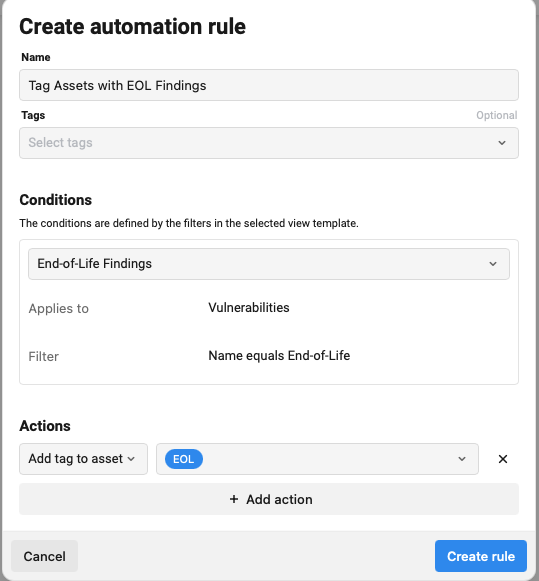
A new automation engine has been introduced to enable automatic actions to be undertaken within the Portal.
In this first implementation it is possible to apply Tags at the end of a Scan to either the Asset itself, or the Findings based on a pre-configured View Template.
We will be expanding the capabilities of the automation engine over the next few months to enable more actions to be automatically undertaken.
Improved Agent Health Checks
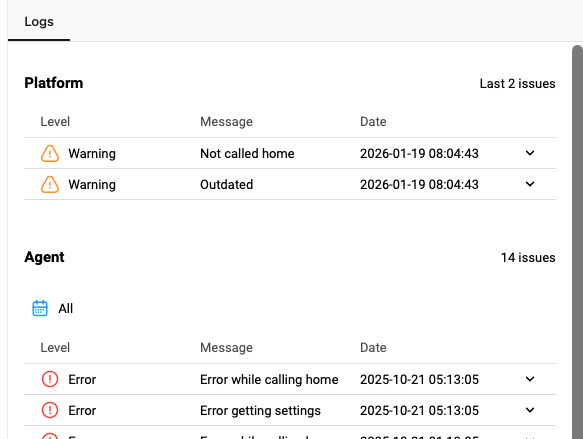
As part of ongoing work to better improve how we report back Agents, we have added a number of Agent Health Checks which will be reported back, and improved the way these are reported back in the UI.
A new ‘Events’ column is available in the Agents view which display any specific issues with the installed Agents, such as ‘Not Calling Home’, ‘Outdated’ or ‘Not Scanning’.

The Detailed view of the Agents now splits the information provided into distinct sections for specific issues we have detected, and general log entries from the Agent.
Support WinRM for Authenticated Scanning In Portal
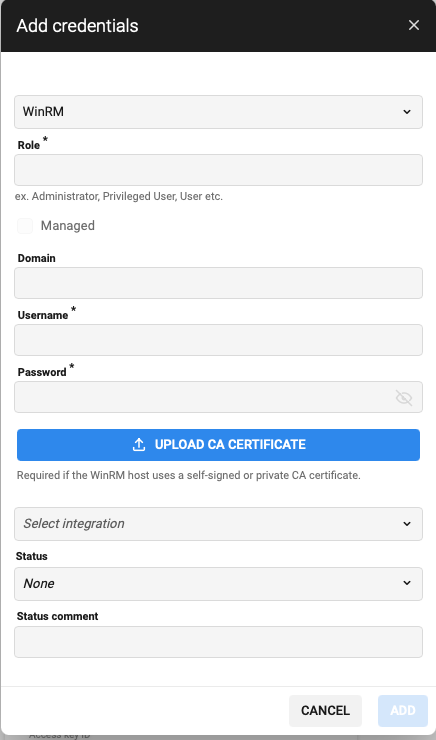
One of the greatest challenges when scanning Windows devices using SMB has always been the amount of configuration required to make the scan successful, such as ensuring File and Print sharing is enabled, something any security minded user is wary about.
We are therefore pleased to announce that we have now added the ability to run Windows scanning using WinRM instead of SMB, allowing a much more secure configuration of the endpoints while still allowing a vulnerability scan to gather the same data.
The ability has been available in our Classic UI for some time now, and it is now available in Portal.
Offsec in Portal
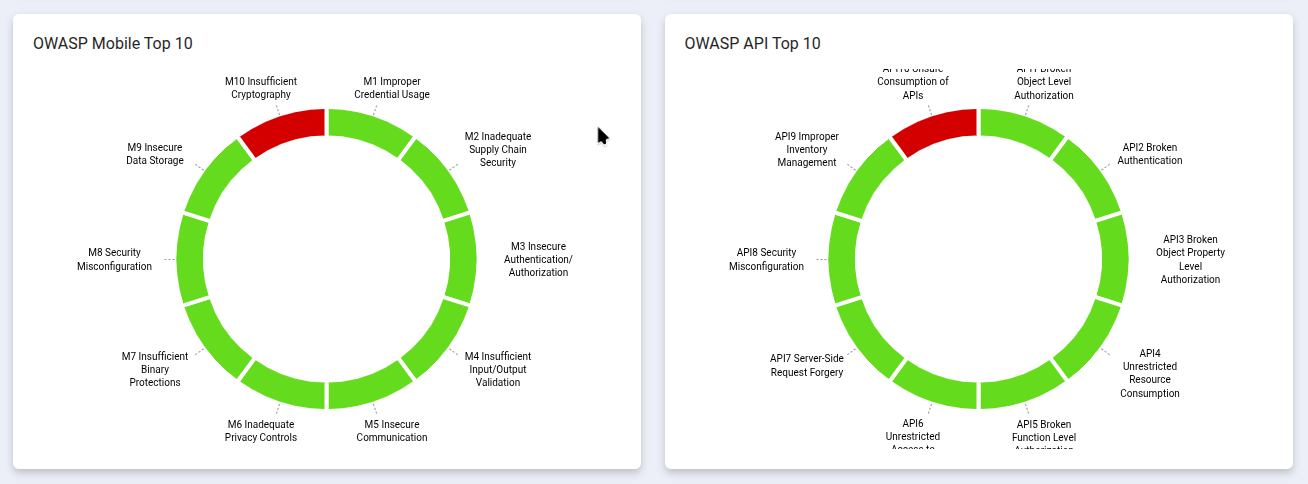
Added OWASP API and OWASP Mobile to the Asset Groups dashboard.
Previously we introduced the API and Mobile types in Asset Groups, as well as the OWAPS API and Mobile Top 10’s. To compliment this, the Asset Groups Dashboard will now, when relevant, include the necessary OWASP Top 10 for Mobile or API.
Bug Fixes and Minor Improvements
Portal
-
When a finding Status changes and a Comment is left to indicate the change, this will now trigger the ‘Comment Created’ Event in Notifications.
-
Updated the default minimum password length and complexity for new accounts to better meet password requirement standards.
-
Maximum age (Days): 0
-
History length: 5
-
Minimum length: 12
-
Enforce lower case: 1
-
Enforce upper case: 1
-
Enforce numeric: 1
-
Enforce special character: 1
-
-
The Asset Groups column has now been added to the Vulnerabilities view.
-
Timezones now work more consistently when using relative time filtering.
-
Fixed an issue with the Relative Time Filtering, where Yesterday was selected, but it did not take into account the relevant time zone.
-
Fixed an issue where the First seen and Last seen dates were swapped.
-
Fixed an issue here the Appendix was not always shown for Offsec reports generated in Portal.
-
Improved the ‘Bulk Actions’ performance to minimize the UI impact when making bulk changes.
-
Fixed an issue with Event Notifications not being triggered when using view templates based on CVSSv3.
-
Fixed an issue with the Managed Credentials check box being cached incorrectly.
-
Improved performance of Discovery Scans executed from Outscan using Outscan RC.
-
Fixed an issue when viewing Delta reports and selecting a configuration or workflow.
-
Improved readability of the ‘Exploits Details’ tab when viewing the detailed view of a Vulnerability.
-
Fixed an issue that stopped filtering on Severity when Japanese or French language was applied.
-
Fixed an issue where Asset Group comments would always be marked as ‘New’.
-
Fixed the layout of the Detailed PDF reports to ensure the text is consistently justified.
-
Excel reports exported from the Asset Groups view will now contain the ‘Asset Name’ column.
-
Improved the accuracy of exported Consumption data, which did not always match that reported within the UI.
Classic UI
-
Updated the default minimum password length and complexity for new accounts to better meet password requirement standards, and added in new Password Policy options for ‘Enforce upper case’ and ‘Enforce lower case’. The default password policy for new accounts is:
-
Maximum age (Days): 0
-
History length: 5
-
Minimum length: 12
-
Enforce lower case: 1
-
Enforce upper case: 1
-
Enforce numeric: 1
-
Enforce special character: 1
-
-
Fixed an issue where the Download Manager was only visible for the Main user.
-
Fixed an issue with SSO and ADFS IdP integration, and a new ‘Authentication with Password’ checkbox has been added.
-
When enabled, it matches any IdP integration use cases where the user uses a password to authenticate:
-
ADFS
-
Azure AD when using authentication with password
-
Okta when using authentication with password
-
OneLogin when using authentication with password
-
-
Disabled it matches all other IdP integration use cases:
-
Azure AD any authentication schema including authentication with password
-
Okta any authentication schema including authentication with password
-
OneLogin any authentication schema including authentication with password
-
-
-
Fixed an issue with the Download Manager displaying an error when exporting large PCI reports.
-
Increased the timeout for HIAB when downloading updates based on the increased package size.
-
Paths show in PCI scanning have improved rendering to ensure improved readability.
-
Fixed an issue where Super Users would sometimes see menu items within the UI that they were not supposed to see. While nothing happened when they were elected, they have now been hidden again to improve legibility of the menus.
Versions
HIAB XML Application Version: v14.31.43
HIAB Image Version: 1771411757
Agent Version: 1.32.16
For more information about Agent versions, see Agent Latest Version.
Vulnerability Detection Update
The latest updates are published here: Vulnerability Detection Update.
End of Life Announcement
Selenium
-
Official End of Life date:
March 31st, 2026 -
Official End of Support date:
March 31st, 2026
Cloudsec
We are announcing the End-of-Life of our Cloudsec products, These will continue to be available until the end of the year after which they will be removed from the product. It will no longer be available both as a Standalone product nor as a part of the OutscanNX licensing.
-
Official End of Life date:
31/12/2026 -
Official End of Support date:
31/12/2026