
Release Date: 2026-04-21
Important notice
We have ceased to use the prefix 2001:67c:1084::/48 and as such it should actively be removed from any whitelists.
New Features
Portal
AI-assisted Authentication for Scale
Configuring authenticated scans in DAST no longer requires recording browser actions or writing custom scripts. You can now describe the login process for a web application in plain English. For example, specifying the login URL, the credentials to use, and the expected success condition, and the system will interpret those instructions, execute them in a browser, and capture the authenticated state for use throughout the scan.
CSV and JSON Export
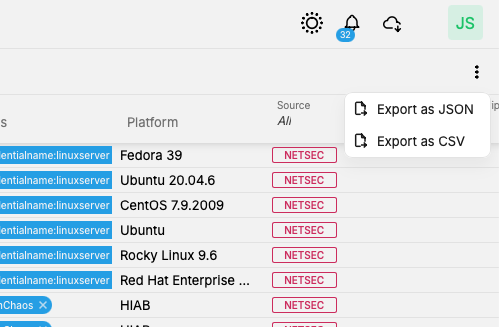
It is now possible to export any table as a JSON and limited tables as CSV, directly from the table view. The export respects your current column layout, applied filters, and selected rows, so the output matches exactly what you see on screen. The export runs in the background without interrupting your workflow, and the file is delivered directly to your browser's download folder — no need to retrieve it from within the Portal UI.
In this release, the CSV export is restricted to just the Assets, Scans, and Vulnerabilities views. The next release will see this extended to all other views.
Credentials Menu moved to the Main Menu
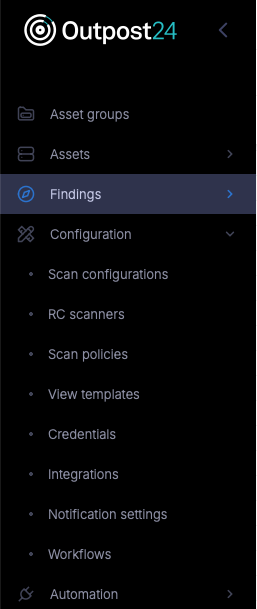
Due to the importance of credentials to all scanning, the Credential menu has been removed from the user menu and added to the main menu, now appearing under the Configuration menu.
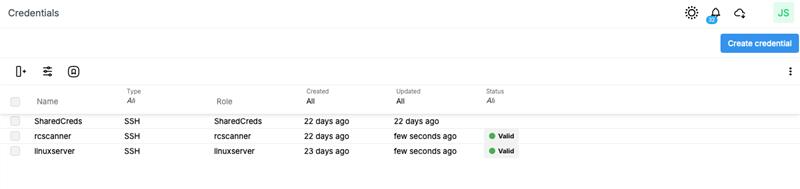
Alongside this improvement, we have also completely overhauled the Credential view, removing the tiled view, which made managing larger volumes of credentials quite cumbersome, and instead introduced a simple list view
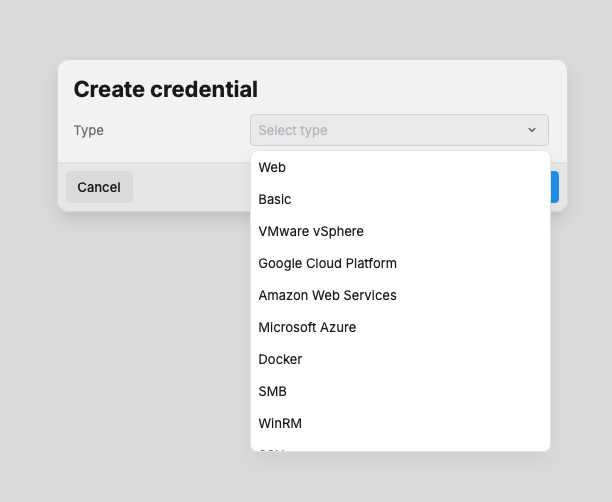
The ‘Create Credentials’ option is also more contextual, showing only the necessary fields based on the initial credential type selection.
Conditional Credentials
Building on last month's release, a number of further enhancements have been introduced, including support for privilege escalation and other credential fields.
If the matched credentials fail, the scan can fall back to other credentials configured in the Policy. Upon successful authentication, the name of the credential set used is recorded, giving full visibility into which credentials were applied during the scan.
Further information can be found in the Knowledgebase here:
https://kb.outpost24.com/kb/internal-credential-reference
Analytics
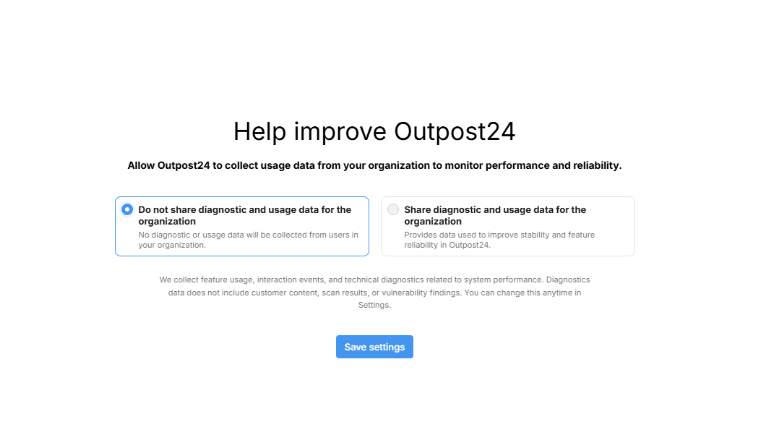
To ensure we help our customers get the best from Portal we have introduced a new analytics layer. This provides us with highly anonymized usage statistics, helping us understand which areas of the tool are getting the most usage, and those where we can invest more resources in improving.
This can be manually enabled/disabled by the ‘Main User':
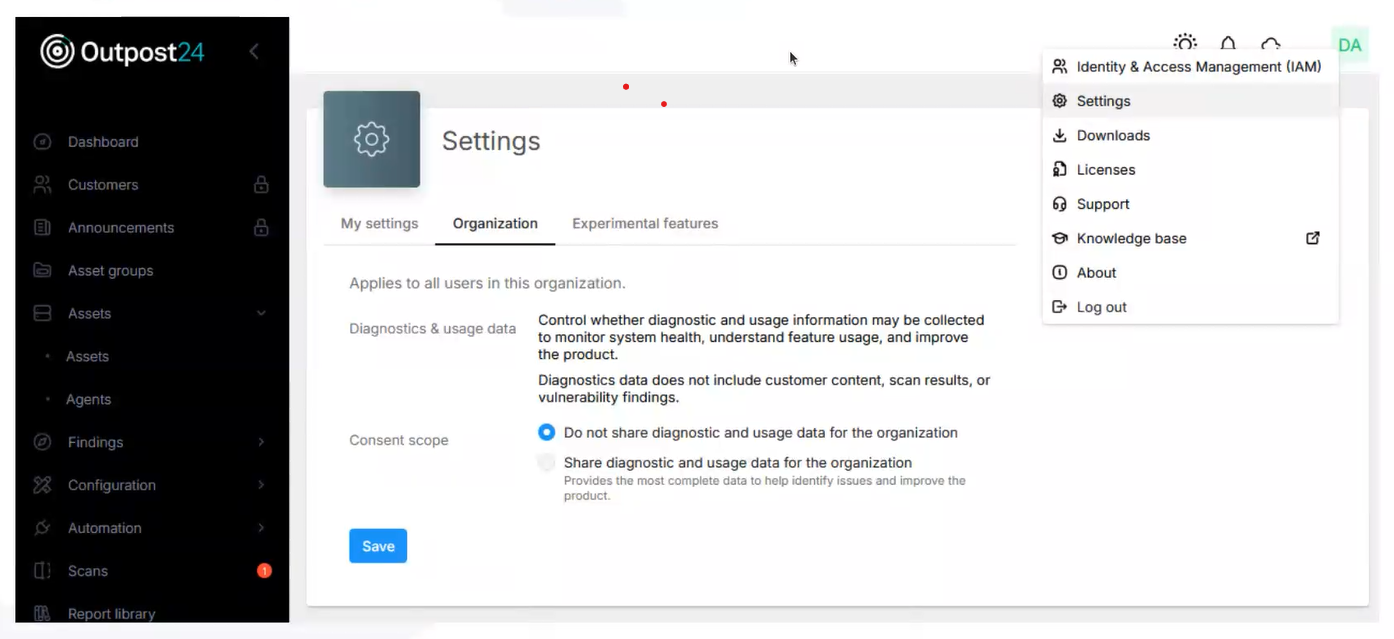
In the future we will also be using this to help build guides for new features and implementations to ensure everyone gets the best from our products and can take full advantage of new capabilities.
For those customers who have not yet received communication regarding this, a pop-up is displayed for the Main User at first login giving the option/out options.
Note for MSSP’s: This applies not only to the MSSP account, but also all of your customer accounts.
Public Preview Features
Follow the link to read more about our Product Stages.
RC Scanners
-
We have now reached Public Preview of our new RC-Scanners, aimed at replacing HIAB scanners for those customers using the Hybrid model for scanning and using Outscan as their main controller and reporting point.
-
RC-Scanners will only be supported in Outscan Portal, and will only be able to scan assets and asset identifiers configured in Portal.
-
The RC-Scanner has been built from the ground up, based on the same containerized technologies we use for our own Outscan Platform.
-
Highlight features include:
-
Installable ISO image, install on your own virtualization platform as necessary.
-
Simplified installation using a generated key. No need to create a username/password when the appliance is deployed by a 3rd party.
-
Easier replacement, simply generate a ‘replacement’ key within Outscan, deploy a new RC-Scanner, provide the new key and it will take over where the old RC-Scanner left off.
-
Open platform, allowing use of your own monitoring tools to monitor resource usage, disk usage etc as well as allowing connectivity testing directly from the underlying OS.
-
Simple automated update system, always ensuring the RC-Scanner is running the latest Outpost24 software.
-
Management of RC-Scanners from within the Portal interface, giving the latest status of the appliance.
-
Supports the same scanning technologies as previous appliances.
-
Bug Fixes and Minor Improvements
Portal
-
Fixed an issue where blocked time slots in Automation Schedules were not displayed in the calendar when the Portal language was set to a language other than English.
-
Fixed a '500 Internal Server Error' that occurred when using Asset Recompose with Scale assets, which caused changes to fail to apply.
-
Fixed an issue where large bulk actions would get stuck in 'Initializing' when a user submitted before the tag data had finished loading.
-
Fixed an issue where the Stop Scan option was always visible in the Scans menu toast notification, regardless of whether a scan was running.
-
Fixed an error in the Solutions view when navigating from Findings.
-
The written Executive Summary in PDF reports has been moved be displayed immediately after the Scope section for improved reading flow.
-
Added week and month navigation arrows to schedule calendars.
-
Renamed Managed Reports to Reports in the IAM view.
-
Updated the default columns displayed in the Agent view to: Asset Name, Asset ID, Name, Version, Last Synchronised, Retired, and Tags.
Versions
HIAB XML Application Version: v14.33.68
HIAB Image Version: 1776149957
Agent Version: 1.32.17
For more information about Agent versions, see Agent Latest Version.
Vulnerability Detection Update
The latest updates are published here: Vulnerability Detection Update.
End of Life Announcement
Selenium
-
Official End of Life date:
2026-06-30 -
Official End of Support date:
2026-06-30
Cloudsec
We are announcing the End-of-Life of our Cloudsec products. These will continue to be available until the end of the year, after which they will be removed from the product. It will no longer be available either as a Standalone product or as a part of the OutscanNX licensing.
-
Official End of Life date:
2026-12-31 -
Official End of Support date:
2026-12-31
Copyright
© 2026 Outpost24® All rights reserved. This document may only be redistributed unedited and unaltered. This document may be cited and referenced only if clearly crediting Outpost24® and this document as the source. Any other reproduction and redistribution in print or electronically is strictly prohibited without explicit permission.
Trademark
Outpost24® and OUTSCAN™ are trademarks of Outpost24® and its affiliated companies. All other brand names, product names or trademarks belong to their respective owners.